Getting hit with a Tinder ban feels like a digital door slamming in your face. Whether you woke up to error code 40303 or noticed your matches vanishing into thin air, you’re probably wondering if there’s any way back. The good news: there are realistic paths forward. The bad news: neither is instant or guaranteed.
In this guide, we’ll walk through exactly what works in 2026 to get unbanned from Tinder—and how to set yourself up so it doesn’t happen again.
Quick Answer: Your Two Real Options
Let’s cut straight to it. If your Tinder account has been banned, there are two common routes forward:
Option 1: File an official Tinder ban appeal through the Appeals Center. This works best if you believe you were banned by mistake—perhaps from mass reports by matches who didn’t appreciate being unmatched, or a photo that was misinterpreted. Appeals take 3-14 days ,and outcomes are not guaranteed based on user-reported experiences.
Option 2: Start completely fresh with a new identity set. This means a new phone number, new email, new device or browser fingerprint, new IP address, and different photos. Simply reinstalling the app won’t work—Tinder’s 2026 detection systems track far more than your login credentials.
For most users facing a permanent ban, especially those whose appeals get denied or ignored, creating a new account becomes the only option. The challenge is doing it properly so you don’t get instantly re-banned.
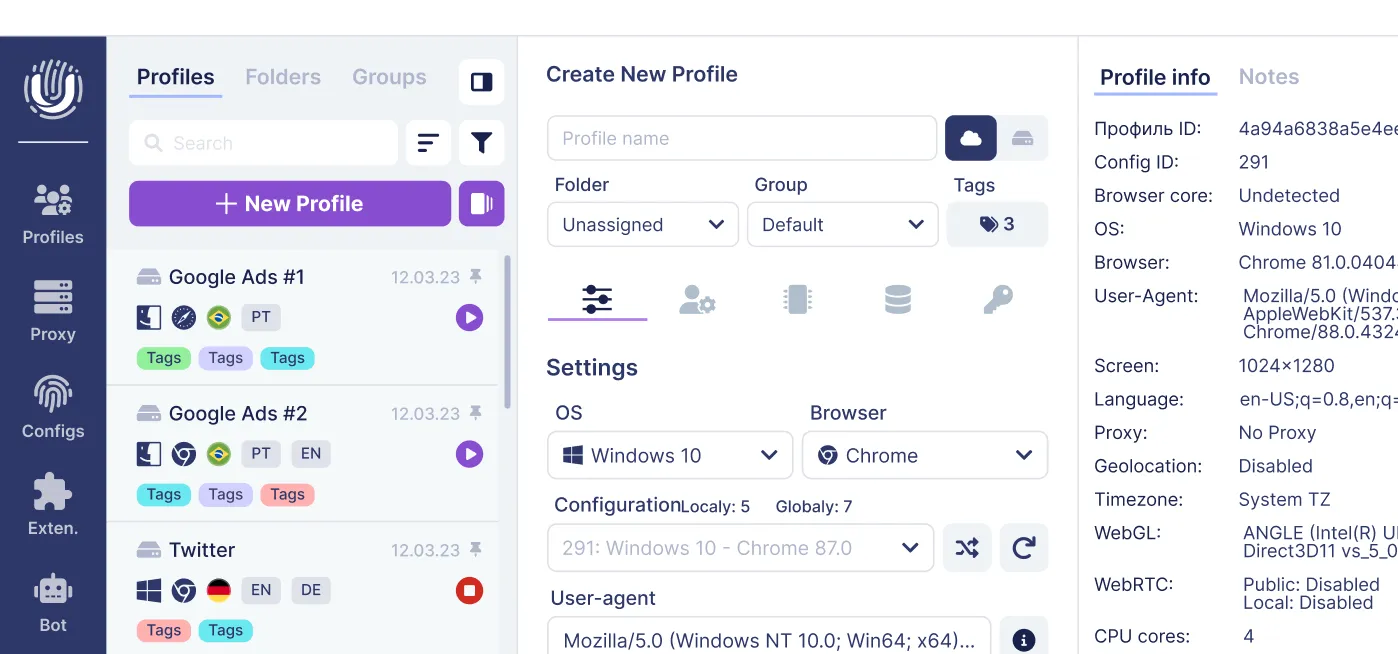
This is where tools like Undetectable.io come into play. As an antidetect browser, it creates isolated browser profiles with unique fingerprints and proxy configurations, making each Tinder account appear as if it’s coming from a completely separate device and location. This dramatically reduces the risk of Tinder linking your new account back to your banned one.
Here’s what you need to understand upfront:
- No tool or hack can reverse a legitimate permanent ban on Tinder’s servers
- Appeals require patience and a single, well-written submission
- Fresh starts require changing everything—phone, email, device fingerprint, IP, and photos
- Following Tinder’s community guidelines after recovery is the only way to stay unbanned
Why Tinder Bans Accounts (and How to Spot Your Type of Ban)
Understanding why you were banned helps you choose the right recovery strategy. Tinder doesn’t always tell you the specific violation, which frustrates many users, but there are patterns worth knowing.
Common reasons Tinder bans accounts in 2024-2026:
- Hate speech or violent content in messages or profile
- Harassment or threatening behavior toward other users
- Spam, commercial promotion, or selling services
- Creating fake profiles or impersonation
- Underage accounts (even accidental age typos)
- Scam activity or solicitation
- Running bots or aggressive automation
- Inappropriate behavior reported by multiple users
Here’s what catches many people off guard: mass reports can trigger bans even if you feel you did nothing wrong. If several users report you over a single weekend—maybe after awkward conversations or rejected advances— Automated systems may flag accounts quickly, and enforcement may happen with limited transparency.
Additionally, using low-quality VPNs, obvious Android emulators, or badly configured multi-account setups can make your account look suspicious to Tinder’s detection systems, leading to a ban even without direct rule violations.
Types of Tinder Bans: Soft Ban, Shadowban, and Hard Ban
Not all bans work the same way, and identifying which type you’re facing determines your next steps.
Soft Ban (Temporary Restriction) Your account shows “Under Review” or certain features become limited. You can still log in, but actions feel glitchy or restricted. These may last from hours to a few days and sometimes resolve on their own if you stop whatever triggered them.
Shadowban This is the sneaky one. You can use Tinder normally—swiping, messaging, everything—but your match rate drops to nearly zero. Your profile becomes invisible or heavily suppressed to other users. Some users report ‘shadowban’-like visibility drops that can last days or weeks, and Tinder won’t confirm it’s happening. Signs include:
- Sudden drop in matches after normal activity
- Messages going unanswered by everyone
- Profile views (if visible) dropping to almost nothing
**Hard Ban (often reported as a permanent ban) **Some users see error code 40303 or a clear message stating “Your account has been banned.” You cannot log in, and attempts to create a new tinder account with the same phone number, email, or device result in immediate re-bans. Hard bans tied to serious violations like offensive language, hate speech, or creating fake profiles are effectively permanent unless Tinder Support reverses them.
Identify which type you’re facing before deciding whether to wait it out, file an appeal, or start fresh.
How Long Does It Take to Get Unbanned from Tinder?
Realistic timelines vary significantly by ban type:
| Ban Type | Typical Duration | Action Required |
| Soft ban / Under Review | 24-72 hours | Wait, stop risky activity |
| Shadowban | Days to weeks | May require appeal or fresh start |
| Hard ban (with appeal) | 3-14 days for response | Submit one clear appeal |
| Hard ban (denied/no response) | Permanent | Full reset required |
If you submit an appeal and don’t receive a response for an extended period, it may be reasonable to plan for a fresh start. Don’t spam Tinder Support with daily follow-ups—one polite, well-constructed appeal is your best shot. Repeatedly messaging support usually doesn’t improve outcomes; one clear appeal is often the best approach.
Method 1: Appealing Your Tinder Ban (When It’s Worth Trying)
Filing an official Tinder appeal is the cleanest path if you genuinely didn’t violate the rules. It’s worth attempting before going through the trouble of a complete reset.
Appeals work best for:
- False reports from matches you unmatched or rejected
- Misunderstood photos (artistic shots flagged as inappropriate)
- Jokes or sarcasm in messages taken out of context
- First-time, minor misinterpretations
Appeals almost never work for:
- Confirmed hate speech or threats
- Scams or commercial solicitation
- Sexual exploitation or explicit content violations
- Underage account issues
- Accounts already appealed and denied
You typically get only one meaningful appeal per incident. Make it count.
Step-by-Step: How to Submit a Tinder Ban Appeal
Here’s the process to navigate the appeals center:
- Open a browser (desktop or mobile) and go to Tinder’s Help Center or directly to tinder.com/appeals-centre
- Select “Trouble with account login” from the menu options
- Choose “Can’t log in, my account was banned” to reach the appeals form
- Log in using your banned account’s email, phone number, Apple ID, or Google credentials
- Tap begin appeal to start the submission process
- Complete the form with your information and explanation
- Tap submit appeal and wait
What to prepare before submitting:
- Phone number associated with the banned account
- Email address linked to the account
- Approximate date you noticed the ban
- Device type (iPhone 15, Samsung Galaxy S24, etc.)
- Brief, factual explanation of the situation
Tinder doesn’t offer live chat or phone support for bans. All communication happens via email, so monitor your inbox and spam folder after submitting.
What to Say (and What Not to Say) in Your Appeal
Your appeal message can make or break your chances. Here’s how to approach it:
What to avoid:
- Attacking or insulting Tinder staff
- Threatening legal action
- Admitting to clear rule-breaking (running bots, selling content)
- Writing multiple paragraphs of angry venting
- Making up false stories that contradict your chat logs
What works better:
- Keep it short and factual (3-5 sentences)
- Mention potential causes like mass reports from unmatched users
- Acknowledge Tinder’s rules and commit to following them
- Take mild accountability if something might have been misunderstood
Sample phrasing ideas:
“I believe my account may have been banned due to reports from users I unmatched. I’ve reviewed the service and community guidelines and will follow them carefully. Could you please review my account?”
“My account was banned and I’m not sure why. I haven’t intentionally violated any rules and would appreciate a review. I’m committed to using Tinder respectfully.”
One calm, clear message beats five frustrated ones. Give it time before following up.
Method 2: Start Fresh with a New Tinder Account (Full Reset)
If your tinder appeal fails or the ban is clearly permanent, your only option is creating a completely new account from scratch. But here’s where many users make critical mistakes.
Simply reinstalling the app and signing up again won’t work. Tinder tracks multiple signals in 2026:
- Phone number
- Email address
- Device and app identifiers (such as advertising IDs where available, plus other device/app signals)
- Browser fingerprint (if using web)
- IP address
- Photo hashes (digital signatures of your images)
- Payment information from premium services
Reusing any of these can trigger an instant re-ban. Many reset attempts fail because users reuse photos or forget to change key signals like IP.
This is where Undetectable.io becomes valuable. It creates isolated browser profiles with unique fingerprints and proxy settings, ensuring your new Tinder account looks like it’s coming from a completely different person on a completely different device.
Prepare New Credentials: Phone Number, Email, and Payment Details
Your “new identity bundle” needs to be completely separate from your old account.
Phone Number
- Get a fresh SIM card or use a reputable online phone service that works reliably with Tinder
- VoIP numbers are often higher-risk or may be rejected on some platforms, so results can vary.
- Your new phone number must never have been linked to Tinder before
Email Address
- Create a new Gmail, Outlook, or other email account
- This email should be new and not previously used with Tinder, and you should avoid connecting any third-party accounts linked to the banned profile
- Don’t use email forwarding from your old address
Payment Details
- If you plan to subscribe to Tinder Gold or a platinum subscription, use different payment methods
- Reusing the Apple ID or Google account tied to your previous Tinder subscription increases linking risk
- Consider starting fresh without premium services initially
Keep a written checklist:
- New phone number (not VoIP)
- New email address
- New Apple/Google account (if applicable)
- Different payment method
Change Device, Browser Fingerprint, and IP
This is where most self-recovery attempts fail. Tinder doesn’t just check your login credentials—it tracks your device’s unique identifiers and your network location.
Device Options:
- Use a different physical device (second phone, spare laptop, tablet)
- A factory reset may reduce some stored app/device signals, but it’s not a guarantee—especially if you restore the same backups/accounts.
- On desktop, use an antidetect browser to create a fresh fingerprint
Browser Fingerprinting Explained: Every browser has a unique “fingerprint” made up of dozens of data points: user agent, screen resolution, installed fonts, WebGL rendering, canvas fingerprint, timezone, language settings, and more. Tinder uses this to identify returning users even when they change accounts, and tools like BrowserLeaks.com anonymity checks can show you exactly what data your setup is exposing.
Undetectable.io solves this by creating isolated browser profiles, each with a completely unique fingerprint. Unlike competitors, Undetectable.io offers unlimited local profiles on paid plans—your data stays on your device, not on third-party servers.
IP Address:
- Connect through a fresh ip that hasn’t been associated with your banned account
- Use a residential or mobile proxy assigned to your new browser profile
- Avoid free VPNs or datacenter proxies that are commonly blacklisted—premium proxy services recommended for Undetectable.io users are a much safer choice
- Your real ip should never be visible when accessing the new account
Each Undetectable.io profile can be paired with its own proxy, so Tinder sees a stable, realistic device/IP combination rather than suspicious rotating endpoints.
Step-by-Step: Creating a New Tinder Account Safely
Follow this chronological checklist for a clean fresh start:
On Mobile:
- Uninstall the Tinder app completely
- Clear all app data and cache from your device settings
- Log out of any Apple ID or Google account linked to your old account
- Restart your device
- Connect to a different Wi-Fi network or mobile data connection not previously used with the banned account
- Install Tinder fresh from the app store
- Sign up using your new phone number and new email
- Skip connecting Facebook, Apple, Google, Instagram, or Spotify accounts linked to your ban
On Desktop with Undetectable.io:
- Download and install Undetectable.io
- Create a new browser profile with realistic fingerprint settings (e.g., Windows 11 + Chrome or macOS + Safari)
- Assign a residential or mobile proxy to that profile
- Set timezone and language to match your proxy’s location
- Launch the profile and browse neutral websites for a few minutes to warm up cookies
- Navigate to Tinder’s web version and sign up with new credentials
- Keep all future logins for this account within the same Undetectable.io profile
Critical reminders:
- Don’t reuse old photos—edit them slightly or use entirely new ones to change the photo hash
- Write a fresh bio with different wording
- Avoid using the same first name if your ban was for serious violations
- Start swiping at a natural pace, not hundreds of swipes per minute
Using Undetectable.io to Avoid Tinder Re-Bans
Undetectable.io is an antidetect browser built for multi-account management with strong browser fingerprint control. While it’s popular among digital marketers, affiliate professionals, and social media managers, it’s equally useful for anyone who needs to maintain separate, isolated online identities.
What makes it different from a simple VPN? A VPN changes your IP address, but leaves your browser fingerprint identical. Tinder can still connect your accounts because everything else—your user agent, canvas rendering, WebGL hash, fonts, and behavioral patterns—remains the same.
Undetectable.io creates fully separate browser environments. Each profile looks like an independent user on a different device, from a different location. This is especially valuable for:
- Recovering from a ban without triggering re-detection
- Managing multiple tinder accounts within a team (e.g., marketing agencies)
- Keeping work and personal accounts completely isolated
Your profiles are stored locally for maximum privacy, meaning sensitive data stays on your machine rather than being uploaded to third-party servers.
Important: Undetectable.io helps with technical isolation, but you still must follow Tinder’s rules. No tool can protect accounts that constantly violate community guidelines.
Why an Antidetect Browser Beats a Simple VPN
Let’s break down the difference:
| Detection Method | VPN Protection | Antidetect Browser (Undetectable.io) |
| IP Address | ✅ Changed | ✅ Changed (via proxy) |
| Browser fingerprint | ❌ Same | ✅ Unique per profile |
| User agent | ❌ Same | ✅ Customizable |
| Canvas/WebGL | ❌ Same | ✅ Spoofed uniquely |
| Timezone/Language | ❌ Often mismatched | ✅ Aligned with proxy |
| Cookies/Storage | ❌ Shared | ✅ Isolated per profile |
Tinder’s detection in 2026 goes far beyond IP checking. The platform analyzes dozens of fingerprint signals and behavioral patterns. A basic VPN leaves most of your identifying data untouched, making it easy for Tinder to connect your new account with your banned one.
With Undetectable.io, each profile simulates a separate real device. You can assign different proxies to each profile, so each Tinder account appears from a stable, unique IP location—not random, constantly-changing endpoints that look suspicious.
For agencies or power users managing multiple dating or social accounts, this prevents chain bans from spreading across their entire setup.
How to Configure an Undetectable.io Profile for Tinder
Here’s how to set up a profile optimized for Tinder recovery:
Step 1: Create a New Profile Open Undetectable.io and create a fresh browser profile. Choose a realistic configuration that matches common devices—Windows 11 with Chrome or macOS with a Safari-like profile work well.
Step 2: Configure Fingerprint Settings Align your timezone, language, and regional settings with your proxy’s IP location. If your proxy shows a New York IP, don’t set your timezone to London.
Step 3: Attach a Quality Proxy Assign a stable residential or mobile proxy to the profile. Avoid free proxies or blacklisted datacenter IPs—these are frequently flagged by Tinder and other platforms.
Step 4: Warm Up the Profile Before signing up for Tinder, turn on cookie-bot to warm up your profile. This generates realistic cookies and browsing history, making the profile look like an established device rather than a freshly-created container, and you can use Whoer.net anonymity checks with an antidetect browser to verify that your IP, DNS, and fingerprint aren’t leaking.
Step 5: Maintain Consistency Always access your Tinder account from the same Undetectable.io profile. Switching profiles or accessing from your regular browser can create fingerprint inconsistencies that trigger reviews.
Step 6: Use Automation Carefully Undetectable.io offers API and automation features, but aggressive bot-like behavior on Tinder is a major ban trigger. If you automate anything, keep it minimal and human-paced.
How to Avoid Getting Banned Again
Getting unbanned from tinder is only half the battle. Staying unbanned requires changing whatever behavior—intentional or not—triggered the ban in the first place.
No technical setup, no matter how sophisticated, can save an account that repeatedly breaks Tinder’s rules or generates enough user reports. In 2025-2026, Tinder’s moderation models are more automated and sensitive than ever, detecting patterns like copy-paste messages, suspiciously fast swiping, and reported conversations.
Here’s how to stay safe long-term.
Follow Tinder’s Community Guidelines Strictly
Tinder publishes community guidelines for a reason. Violating community guidelines—even unintentionally—is the fastest route to another ban.
Behaviors that trigger bans quickly:
- Nudity or explicit sexual photos in your tinder profile
- Hate speech, slurs, or discriminatory language
- Threats, doxxing, or violent content
- Scam activity or financial solicitation
- Anything involving minors
- OnlyFans, adult service, or monetized links in bio
- Violent memes or offensive images in photos
Keep your profile “dating focused”:
- Photos should be PG-13 friendly
- Bio text should be about connection, not commerce
- Avoid edgy jokes that could be misread as harassment
- Don’t use Tinder primarily to drive traffic elsewhere
Even a “joke” in your bio or messages can look like inappropriate behavior to moderators or other users reviewing reports.
Don’t Abuse Automation, Bots, or Mass Swiping
Tinder’s anti-bot systems have become increasingly sophisticated. They detect:
- Hundreds of swipes per minute
- Identical first messages sent to many matches
- 24/7 activity with no natural rest periods
- Patterns consistent with auto-swipers and third-party tools
Auto-swiping tools and aggressive bots are a major reason for instant bans and repeated shadowbans. Even if you get a new account working, these behaviors will get it flagged quickly.
Safer patterns:
- Swipe in shorter, realistic sessions (15-30 minutes)
- Mix likes and passes naturally
- Write unique openers based on each person’s profile
- Take breaks between sessions
Even when using Undetectable.io for account isolation, you must act manually or very conservatively. The goal is account safety, not gaming the system. Slow and real beats fast and spammy every time.
Keep Your Profile Authentic and Respectful
Authenticity matters more than ever for avoiding reports:
- Use your real name (or a reasonable nickname)
- Display your actual age accurately
- Upload recent, clear photos that actually look like you
- Avoid heavily filtered or AI-generated images
- Never use celebrity photos or stolen images
Impersonation and catfishing are taken especially seriously. Creating fake profiles leads to non-reversible bans.
Chat behavior that gets reported quickly:
- Unsolicited explicit images or messages
- Insults or hostile responses to rejection
- Pressure to meet immediately or share personal info
- Aggressive sales pitches or link spamming
Remember: enough reports (even 2-3 in a short period) can trigger a review and warning or ban. Treat matches like real people, because they are.
FAQ: Getting Unbanned from Tinder in 2026
Is it really possible to get unbanned from Tinder? Yes, but with caveats. Some bans can be reversed through the official appeal process, especially for first-time or mistaken violations. If your appeal fails or you never receive a response, your only path is creating a completely new account with fresh credentials, device fingerprint, and IP address—ideally using an antidetect browser like Undetectable.io.
How long do Tinder bans last? Temporary restrictions and soft bans typically clear within 24-72 hours. Shadowbans can last days to weeks. Hard bans (error 40303) are effectively permanent unless Tinder Support reverses them through the appeal process.
Does Tinder check IP addresses and device IDs? Yes. Tinder tracks your IP address, device identifiers, and browser fingerprint. This is why a VPN alone is often not enough—it changes your IP but leaves dozens of other identifying signals unchanged.
Can I just make a new Tinder account right away? Only if you change everything: new phone number, new email, different photos (edited to change the hash), new device or browser fingerprint, and a different ip address. Using Undetectable.io to create an isolated browser profile with its own proxy significantly reduces the risk of your new account being linked to the banned one.
Should I use a modded Tinder app? No. Unofficial or modded Tinder apps are risky and can lead to additional bans or security issues. Stick with the official Tinder app and web version.
What if my appeal gets denied? If denied, Tinder rarely provides detailed explanations. Your remaining option is the full reset method: new credentials, new device fingerprint, new IP, and new photos. One strong appeal is worth sending, but repeated appeals for the same ban typically don’t help.
Conclusion: Recover Your Account and Swipe Smarter
Getting banned on tinder feels harsh, but it doesn’t have to mean the end of your dating life on the app. Whether your ban was deserved or a mistake, there are realistic paths forward.
Start with a careful, honest appeal if you believe the ban was unwarranted. Give Tinder support time to review—one well-written message is worth more than a dozen angry follow-ups. If that fails, commit to a thorough reset: new credentials, new device fingerprint, fresh IP, and different profile content.
Tools like Undetectable.io make the technical side of recovery significantly easier. By isolating each Tinder account into its own browser profile with unique fingerprints and dedicated proxy settings, you reduce the risk of technical linking that causes instant re-bans. Unlike many alternatives, Undetectable.io stores profiles locally on your device—your data stays yours.
The bigger picture? Focus on using Tinder the way it’s meant to be used: authentic profiles, respectful conversations, and natural engagement. No antidetect setup can protect an account that consistently generates reports or breaks rules.
If you manage multiple social or dating accounts—whether for personal use or as part of a marketing team—consider starting with Undetectable.io’s free plan to explore how isolated browser profiles can protect your setups from chain bans and cross-contamination.
Good luck out there. Swipe responsibly.